> ## Documentation Index
> Fetch the complete documentation index at: https://docs.hellotars.com/llms.txt
> Use this file to discover all available pages before exploring further.
# Understanding Tars
> Essential building blocks of the Tars platform - understand these core concepts before you start building
Before diving into building your first **AI Agent**, let's understand the fundamental concepts that power **Tars**.
## What is Tars?
Tars is a visual, no-code platform that empowers anyone to build sophisticated **conversational AI Agents (CX Agents)** without writing a single line of code. Using an intuitive **drag-and-drop interface**, you can design conversation flows just like creating a flowchart.
## What are Gambits in Tars?
A Gambit represents one single **back-and-forth conversation** between the **Agent** and **User**.
* It's the fundamental unit of interaction in **Tars**, where each Gambit contains the messages your Agent sends and the input options users have to respond.
* You build conversations by adding **Gambits** to your canvas and connecting them to define the **conversation flow**.
* A series of connected **Gambits** creates the complete user journey through your **AI Agent**.
* **Gambits** must be connected to each other for the conversation to flow. An unconnected Gambit will never be executed.
## What are the different types of Gambits?
### User input Gambits
User input Gambits collect specific information from users through structured inputs like text fields, buttons, date pickers, and ratings. Use them to gather validated data such as emails or preferences for personalized interactions.
| Gambit | Description |
| ----------- | ---------------------------------------------------------------------------------------- |
| Text | Collect free-form text responses with validation options (email, phone, full name, etc.) |
| Button | Predefined options users can tap to select |
| Date time | Allows users to pick date and time with better UI |
| Star rating | Gather satisfaction scores or feedback with star ratings or scales |
| No input | Display content without requiring user response |
| Cards | Visual cards users can choose from with images and descriptions (coming soon) |
| File upload | Allow users to share documents, images, or other files (coming soon) |
| Location | Capture user location data (coming soon) |
### AI powered Gambits
AI-powered Gambits use artificial intelligence for dynamic responses, natural language understanding, and tasks like answering FAQs or extracting data. Ideal for flexible scenarios like customer support, they create adaptive conversations that feel human-like.
| Gambit | Description |
| -------------- | ----------------------------------------------------------------------------- |
| AI Agent | Handle complete autonomous conversations with access to tools and knowledge |
| Q & A | Answer questions using your Knowledge Base with semantic search |
| Data collector | Pull specific information from user messages (names, dates, emails, entities) |
| Categorizer | Understands what the user wants to accomplish from their message |
### Tool Gambits
Tool Gambits enable your AI Agent to perform real-time actions by connecting to external tools and services. When a tool Gambit is linked to an AI Agent Gambit, it allows the Agent to execute tasks like updating CRM records or scheduling appointments using over 600+ pre-built integrations.
### API Gambit
The API Gambit is a flexible integration tool executed in the conversation workflow. It allows making HTTP requests to any REST API endpoint with custom data, ideal when pre-built tools don't meet your requirements.
### Live Chat handoff
Live Chat handoff enables escalation to human agents for complex queries or issues AI can't handle.You can set conditional workflows based on the user's message content, sentiment, or other criteria to trigger a Live Chat handoff.
## What is an AI Agent?
An **AI Agent** in **Tars** is a dynamic, goal-driven, and tool-enabled system that can complete complex tasks and transform workflows, going far beyond traditional chatbots or automation scripts.
What does that mean? It means the AI Agent can:
* Understand and pursue specific goals during conversations
* Use built-in tools to fetch data, send emails, or update systems
* Adapt its approach based on user responses and context
For example, instead of just answering questions, it can book a meeting, check inventory, and follow up—all in one chat. This makes it ideal for customer service, sales, or any scenario needing smart, proactive assistance.
## What is a knowledge Base?
A **knowledge Base** in **Tars** is a repository of information that your **AI Agent** can tap into to provide accurate and informative responses to user queries. By performing semantic searches over this knowledge base, the Agent can retrieve relevant content and generate responses that are grounded in factual information.
The benefits of using a knowledge Base include:
* Dynamic retrieval from trained content
* Consistent, fact-based answers across all conversations
* Prevention of AI hallucination by relying on real content
## Tools
A **Tool** in **Tars** is an integration that allows your AI Agent to interact with external systems, databases, or services.
Tools empower your Agent to:
* Fetch, create, update, or delete data in connected platforms
* Go beyond conversation and perform real-world tasks
Common tool integrations include:
* **CRM systems** (like HubSpot and Salesforce)
* **Productivity tools** (such as Google Sheets)
* **Communication services**
* **Calendars**
* **Payment processors**
## Conversation Flow: The Flowchart Analogy
Visualize your TARS conversation flow as a flowchart. Each **node** is a **Gambit**, and connections between nodes define the possible conversation paths.
### Starting the Conversation
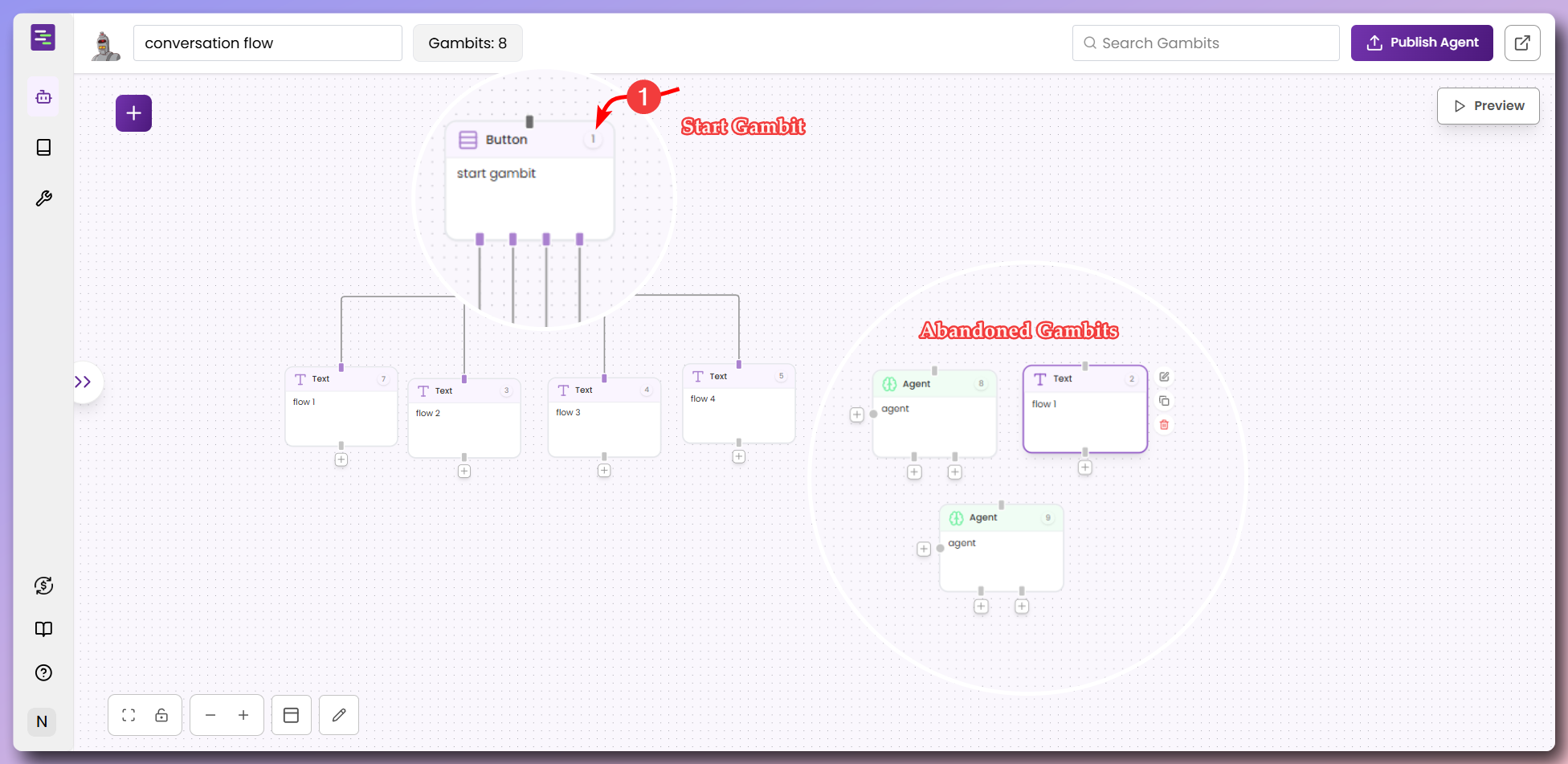
* The **first Gambit** you add to the canvas becomes the **Start Gambit** and is assigned Gambit number **1**.
* Every Gambit has a **single input socket** at the top (where the flow enters) and **one or more output sockets** at the bottom.
* **Abandoned Gambits** are those not connected to any flow—they will never execute even if perfectly configured.
 ### Gambit Execution Phases
Each Gambit executes in three phases:
1. **Pre Phase:** Renders agent content to the user (e.g., greeting, info).
2. **Post Phase:** Collects and processes user input.
3. **Jump (Exit) Phase:** Determines which Gambit to go to next.
### Flow Patterns
#### Linear Flow
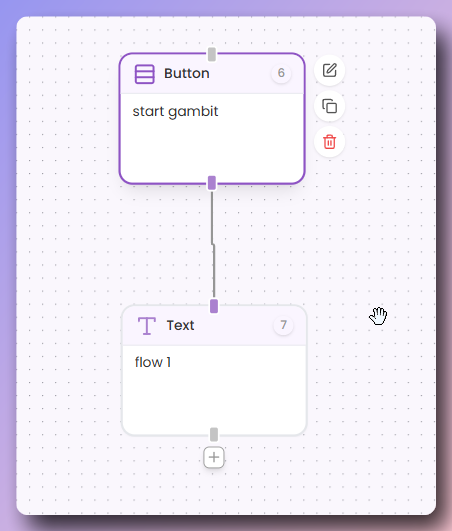
A simple, straight-line conversation where one Gambit leads directly to the next.
### Gambit Execution Phases
Each Gambit executes in three phases:
1. **Pre Phase:** Renders agent content to the user (e.g., greeting, info).
2. **Post Phase:** Collects and processes user input.
3. **Jump (Exit) Phase:** Determines which Gambit to go to next.
### Flow Patterns
#### Linear Flow
A simple, straight-line conversation where one Gambit leads directly to the next.
 #### Branching Flow
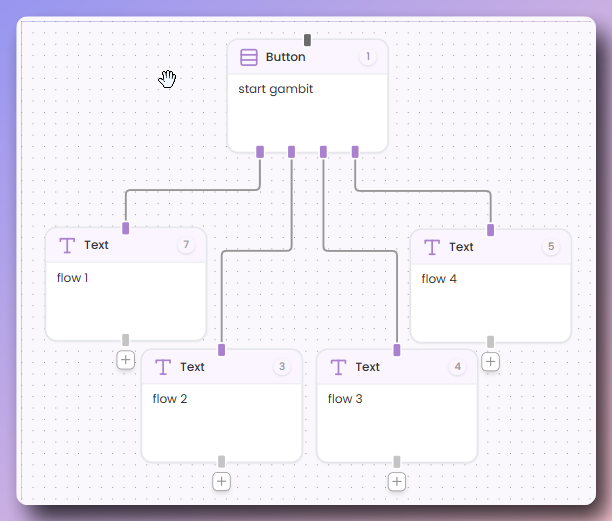
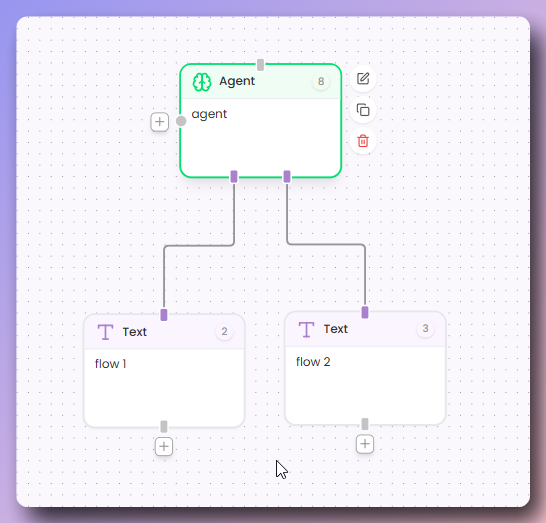
Multiple output sockets create different conversation paths based on user choices or logic.
#### Branching Flow
Multiple output sockets create different conversation paths based on user choices or logic.
 #### Cyclic Flow
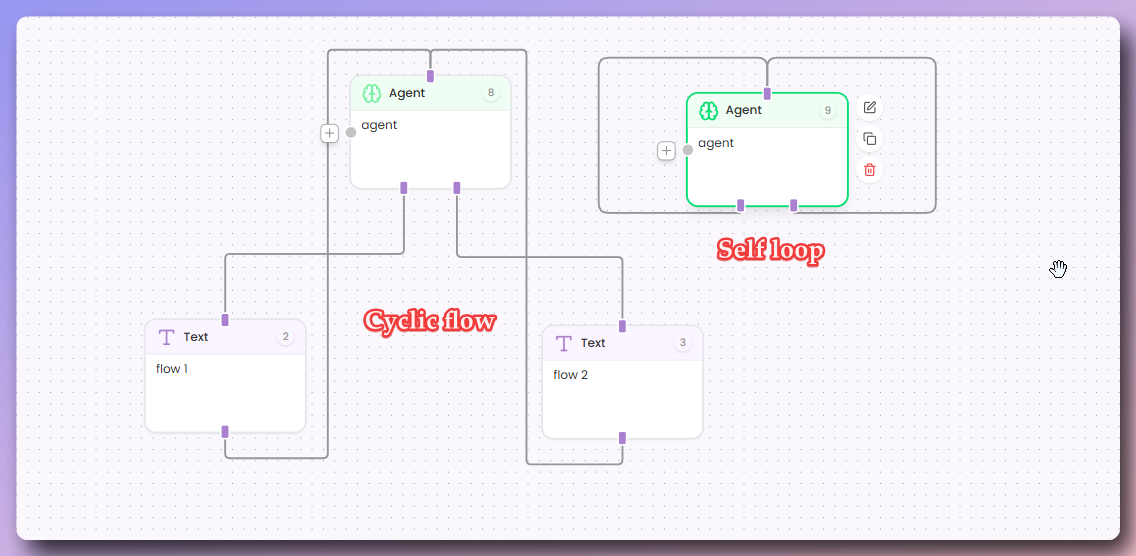
Connect a Gambit's output back to itself or to a previous Gambit to create loops for repeated interactions.
#### Cyclic Flow
Connect a Gambit's output back to itself or to a previous Gambit to create loops for repeated interactions.
 ### Ending the Conversation
* If a Gambit has no connected output socket, the conversation ends.
## Common beginner mistak
**Gambits** left unconnected will never execute regardless of configuration. After adding a Gambit, immediately connect it with a **pipe** to the previous step and use **preview mode** to verify all paths are accessible.
Overcomplicating flows with unnecessary **Gambits** makes your Agent harder to maintain. Start with the minimum number needed - a simple conversation might only need three to five **Gambits**. Add complexity only when necessary.
The **AI Agent** Gambit needs detailed **base prompt** instructions including the Agent's role and purpose, what information sources to use, tone and personality guidelines, and what it should and should not do. Vague instructions lead to generic or unpredictable responses.
Without a **Knowledge Base**, your **AI Agent** either makes up answers or gives generic responses. Before deploying customer-facing Agents, create a comprehensive **Knowledge Base** with your documentation, FAQs, and key information.
Test every possible **conversation path** using **preview mode**. Try different user responses and verify that **data flows** correctly between **Gambits** before deployment.
### Ending the Conversation
* If a Gambit has no connected output socket, the conversation ends.
## Common beginner mistak
**Gambits** left unconnected will never execute regardless of configuration. After adding a Gambit, immediately connect it with a **pipe** to the previous step and use **preview mode** to verify all paths are accessible.
Overcomplicating flows with unnecessary **Gambits** makes your Agent harder to maintain. Start with the minimum number needed - a simple conversation might only need three to five **Gambits**. Add complexity only when necessary.
The **AI Agent** Gambit needs detailed **base prompt** instructions including the Agent's role and purpose, what information sources to use, tone and personality guidelines, and what it should and should not do. Vague instructions lead to generic or unpredictable responses.
Without a **Knowledge Base**, your **AI Agent** either makes up answers or gives generic responses. Before deploying customer-facing Agents, create a comprehensive **Knowledge Base** with your documentation, FAQs, and key information.
Test every possible **conversation path** using **preview mode**. Try different user responses and verify that **data flows** correctly between **Gambits** before deployment.