> ## Documentation Index
> Fetch the complete documentation index at: https://docs.hellotars.com/llms.txt
> Use this file to discover all available pages before exploring further.
# Manage your billing and subscription in your billing page
> Explore how to manage your subscription, payment methods, and invoices
Billing Settings provide comprehensive control over your subscription plans, payment methods, and billing history.
## Subscription plans
Compare and manage your subscription plan with detailed feature breakdowns.
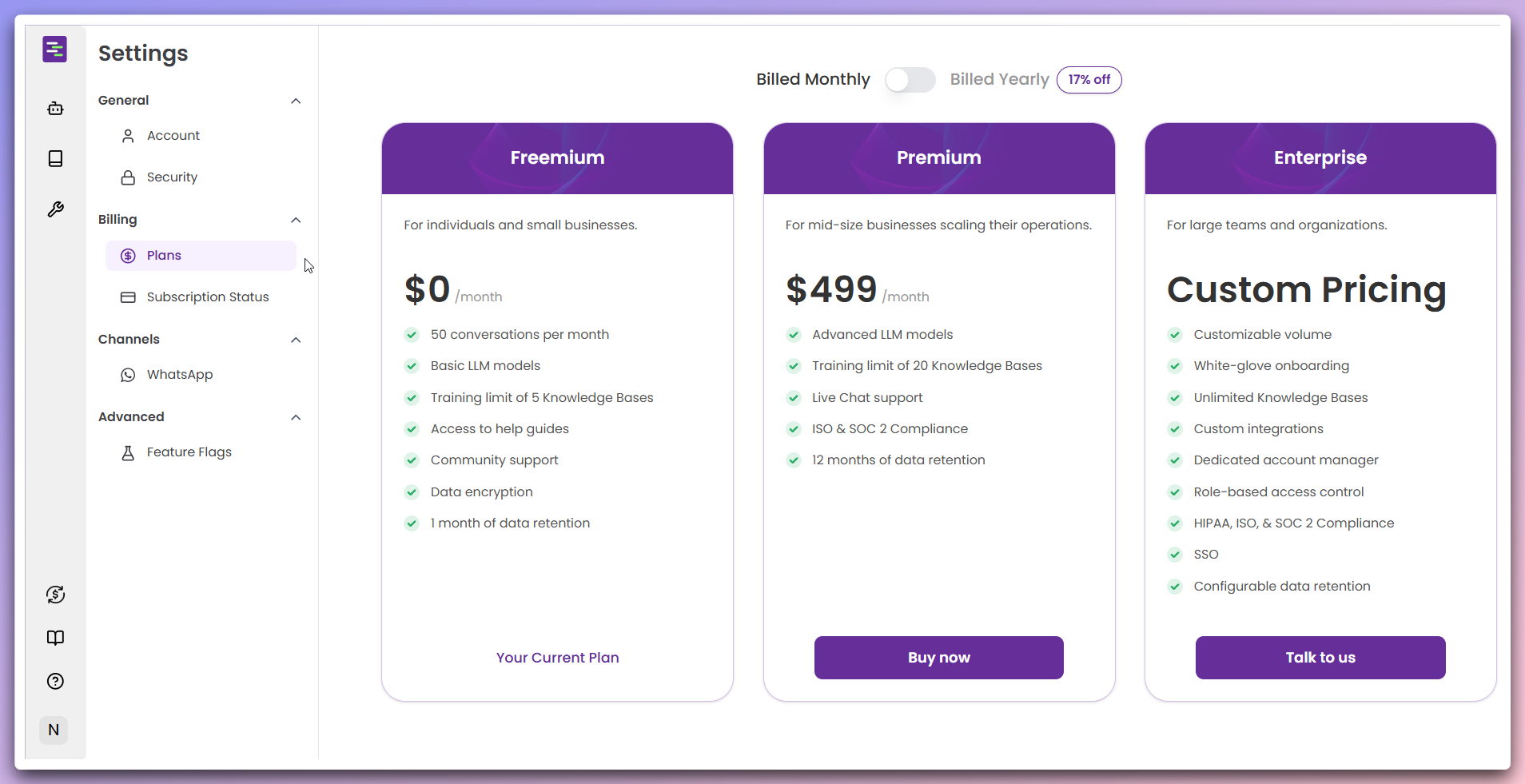 Choose your preferred billing cycle at the top of the plans section:
**Billing Options:**
* **Billed Monthly**: Standard monthly billing cycle
* **Billed Yearly**: Annual billing with 17% discount savings
**Annual Savings**: Choose yearly billing to save 17% on your subscription costs.
Review the three available subscription tiers: **Freemium Plan ($0/month):** -
50 conversations per month - Basic LLM models - Training limit of 5 Knowledge
Bases - Access to help guides and community support - Data encryption and 1
month data retention **Premium Plan ($499/month):** - Advanced LLM models -
Training limit of 20 Knowledge Bases - Live Chat support - ISO & SOC 2
Compliance - 12 months of data retention **Enterprise Plan (Custom Pricing):**
* Customizable volume - White-glove onboarding - Unlimited Knowledge Bases -
Custom integrations and dedicated account manager - Role-based access control
* HIPAA, ISO, & SOC 2 Compliance - SSO and configurable data retention
**Plan comparison**: Each plan is designed for different business sizes and
requirements.
Select your desired plan and complete the upgrade process: **For Current
Freemium Users:** - Click `Buy now` on Premium or `Talk to us` on Enterprise
plans - Follow the checkout process to upgrade **For New Users:** - Click `Buy
now` on your preferred plan or `Talk to us` on Enterprise plan - Complete
payment setup during registration **For Enterprise:** - Click `Talk to us` to
discuss custom pricing - Schedule a consultation with our sales team
**Plan changes**: Upgrading your plan will take effect immediately.
Downgrading may require waiting until the next billing cycle.
After clicking `Buy now`, you'll be redirected to the secure Stripe payment gateway:
Choose your preferred billing cycle at the top of the plans section:
**Billing Options:**
* **Billed Monthly**: Standard monthly billing cycle
* **Billed Yearly**: Annual billing with 17% discount savings
**Annual Savings**: Choose yearly billing to save 17% on your subscription costs.
Review the three available subscription tiers: **Freemium Plan ($0/month):** -
50 conversations per month - Basic LLM models - Training limit of 5 Knowledge
Bases - Access to help guides and community support - Data encryption and 1
month data retention **Premium Plan ($499/month):** - Advanced LLM models -
Training limit of 20 Knowledge Bases - Live Chat support - ISO & SOC 2
Compliance - 12 months of data retention **Enterprise Plan (Custom Pricing):**
* Customizable volume - White-glove onboarding - Unlimited Knowledge Bases -
Custom integrations and dedicated account manager - Role-based access control
* HIPAA, ISO, & SOC 2 Compliance - SSO and configurable data retention
**Plan comparison**: Each plan is designed for different business sizes and
requirements.
Select your desired plan and complete the upgrade process: **For Current
Freemium Users:** - Click `Buy now` on Premium or `Talk to us` on Enterprise
plans - Follow the checkout process to upgrade **For New Users:** - Click `Buy
now` on your preferred plan or `Talk to us` on Enterprise plan - Complete
payment setup during registration **For Enterprise:** - Click `Talk to us` to
discuss custom pricing - Schedule a consultation with our sales team
**Plan changes**: Upgrading your plan will take effect immediately.
Downgrading may require waiting until the next billing cycle.
After clicking `Buy now`, you'll be redirected to the secure Stripe payment gateway:
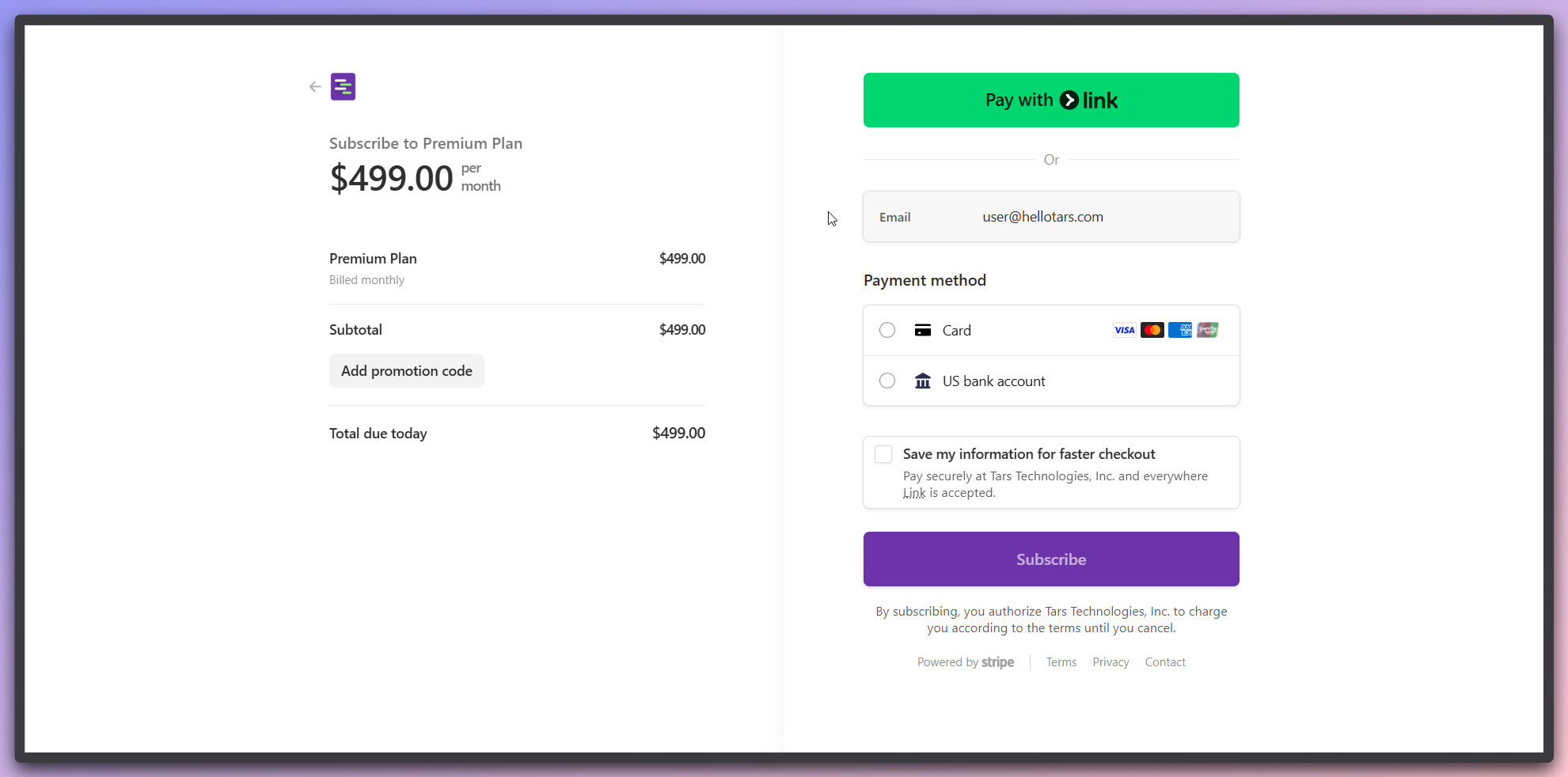 **Order summary section:**
* Review your selected plan details (e.g., "Subscribe to Premium Plan")
* Confirm the pricing: `$499.00 per month`
* Check billing frequency: "Billed monthly"
* Verify subtotal and total due today
* Optionally add a promotion code using the `Add promotion code` button
**Payment information section:**
* **Email verification**: Confirm your email address
* **Payment method selection**:
* **Card payment**: Select `Card` option with support for Visa, Mastercard, American Express, and UnionPay
* **Bank account**: Choose `US bank account` option for direct bank transfers
* **Quick checkout**: Use `Pay with Link` button for faster payment processing
* **Save information**: Optionally check "Save my information for faster checkout"
**Complete subscription:**
* Click the `Subscribe` button to finalize your subscription
* Review the authorization text: "By subscribing, you authorize Tars Technologies, Inc. to charge you according to the terms until you cancel"
**Secure payment**: All payments are processed securely through Stripe, ensuring your financial information is protected.
**Payment confirmation**: Once payment is successful, your subscription will be activated immediately and you'll receive a confirmation email.
## Subscription status
Monitor your current subscription details and billing information.
**Order summary section:**
* Review your selected plan details (e.g., "Subscribe to Premium Plan")
* Confirm the pricing: `$499.00 per month`
* Check billing frequency: "Billed monthly"
* Verify subtotal and total due today
* Optionally add a promotion code using the `Add promotion code` button
**Payment information section:**
* **Email verification**: Confirm your email address
* **Payment method selection**:
* **Card payment**: Select `Card` option with support for Visa, Mastercard, American Express, and UnionPay
* **Bank account**: Choose `US bank account` option for direct bank transfers
* **Quick checkout**: Use `Pay with Link` button for faster payment processing
* **Save information**: Optionally check "Save my information for faster checkout"
**Complete subscription:**
* Click the `Subscribe` button to finalize your subscription
* Review the authorization text: "By subscribing, you authorize Tars Technologies, Inc. to charge you according to the terms until you cancel"
**Secure payment**: All payments are processed securely through Stripe, ensuring your financial information is protected.
**Payment confirmation**: Once payment is successful, your subscription will be activated immediately and you'll receive a confirmation email.
## Subscription status
Monitor your current subscription details and billing information.
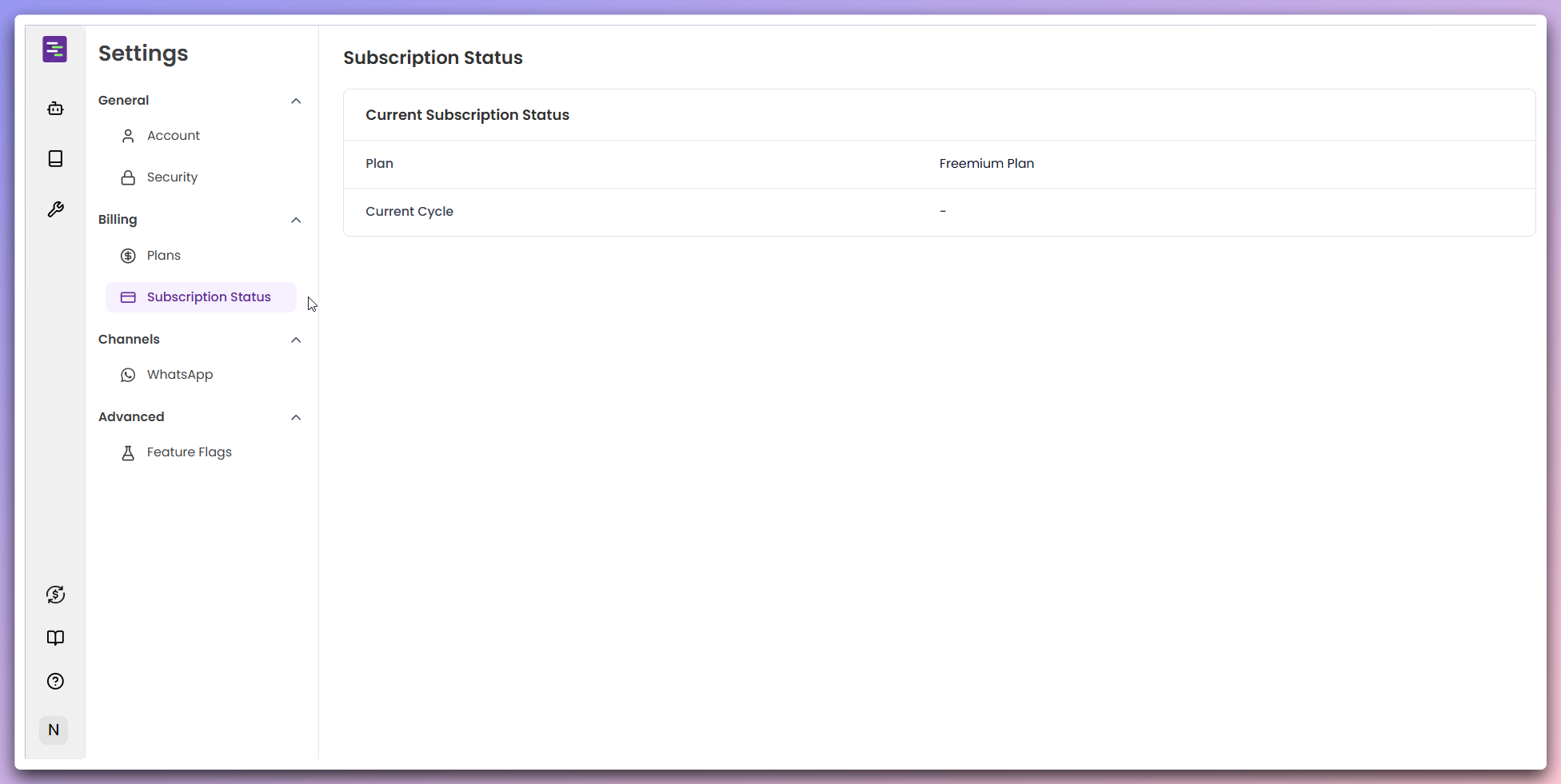 In the **Current subscription status** section, review your active plan:
**Plan information:**
* **Plan**: Shows your current subscription tier (e.g., "Freemium Plan")
* **Current cycle**: Displays your billing cycle information
**Freemium users**: Current cycle shows "-" as there's no active billing cycle for free plans.
Track your plan usage and remaining limits: **Usage tracking:** - Monitor your
current usage against plan limits - View remaining capacity for your
subscription tier
**Usage monitoring**: Keep track of your usage to ensure you stay within
your plan limits.
Configure your payment and billing preferences:
**Payment management:**
* Update credit card information
* Change billing address
* Download invoices and payment history
* Configure auto-renewal settings
**Billing history:**
* View past transactions
* Download receipts and invoices
* Track payment status and dates
**Payment issues**: Ensure your payment method is up to date to avoid service interruptions.
## Best practices
**Plan optimization**: Review your usage analytics monthly to ensure you're on
the most cost-effective plan for your needs.
**Usage limits**: Exceeding your plan limits may result in additional charges
or service restrictions. Monitor your usage regularly.
**Secure payments**: All payment information is encrypted and processed
securely through our payment partners.
In the **Current subscription status** section, review your active plan:
**Plan information:**
* **Plan**: Shows your current subscription tier (e.g., "Freemium Plan")
* **Current cycle**: Displays your billing cycle information
**Freemium users**: Current cycle shows "-" as there's no active billing cycle for free plans.
Track your plan usage and remaining limits: **Usage tracking:** - Monitor your
current usage against plan limits - View remaining capacity for your
subscription tier
**Usage monitoring**: Keep track of your usage to ensure you stay within
your plan limits.
Configure your payment and billing preferences:
**Payment management:**
* Update credit card information
* Change billing address
* Download invoices and payment history
* Configure auto-renewal settings
**Billing history:**
* View past transactions
* Download receipts and invoices
* Track payment status and dates
**Payment issues**: Ensure your payment method is up to date to avoid service interruptions.
## Best practices
**Plan optimization**: Review your usage analytics monthly to ensure you're on
the most cost-effective plan for your needs.
**Usage limits**: Exceeding your plan limits may result in additional charges
or service restrictions. Monitor your usage regularly.
**Secure payments**: All payment information is encrypted and processed
securely through our payment partners.