> ## Documentation Index
> Fetch the complete documentation index at: https://docs.hellotars.com/llms.txt
> Use this file to discover all available pages before exploring further.
# Schedule a demo
> Book a personalized demonstration with our team
Schedule a Demo allows you to book a personalized demonstration with our team to explore how TARS can address your specific business needs and implementation requirements.
 ## Booking your demo
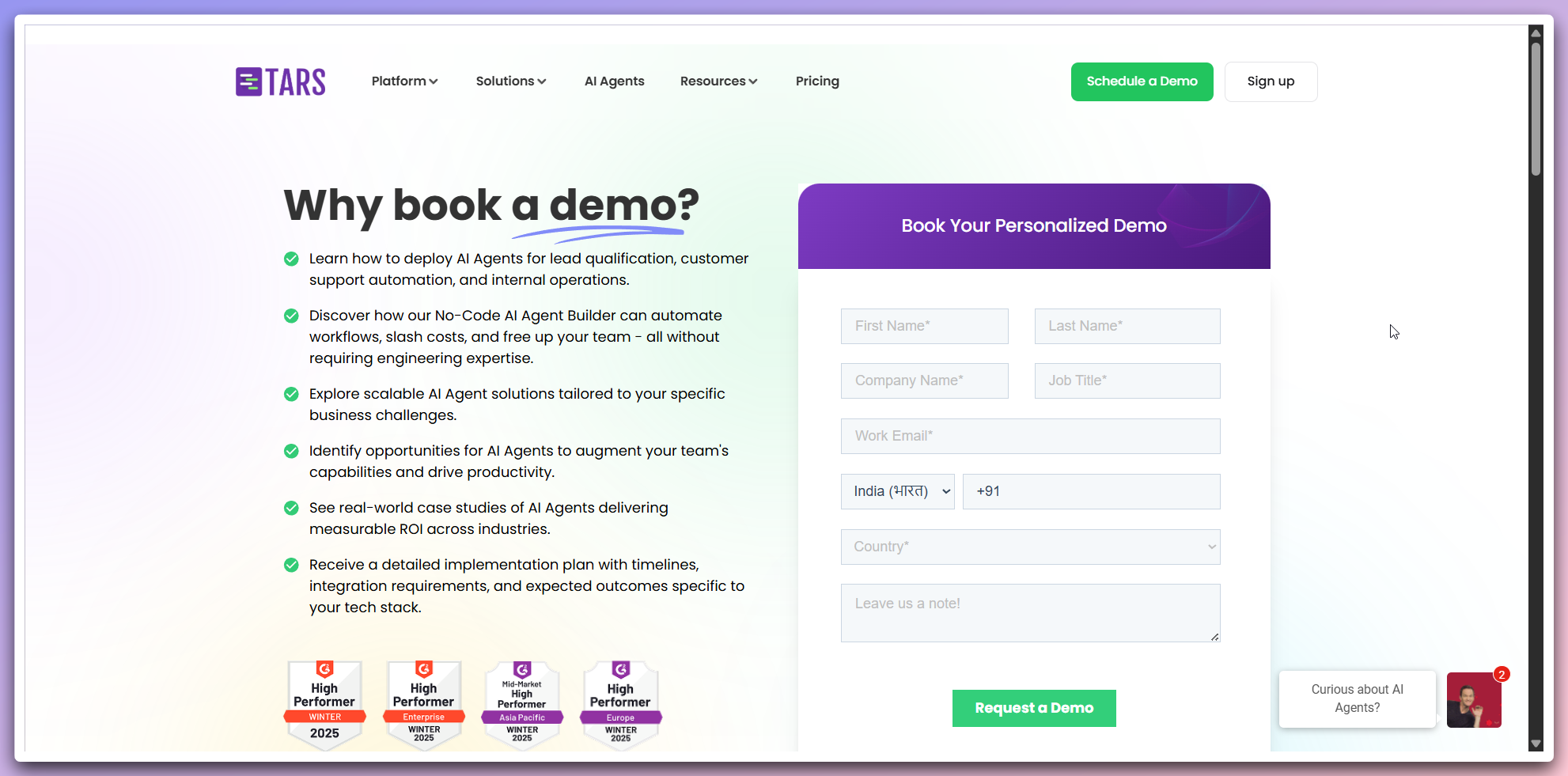
The demo booking page opens with comprehensive information about why you
should book a demo.
**Why book a demo:**
* **Learn deployment**: How to deploy AI Agents for lead qualification, customer support automation, and internal operations
* **No-code builder**: Discover how our No-Code AI Agent Builder can automate workflows, slash costs, and free up your team
* **Scalable solutions**: Explore scalable AI Agent solutions tailored to your specific business challenges
* **Team augmentation**: Identify opportunities for AI Agents to augment your team's capabilities and drive productivity
* **Real-world cases**: See real-world case studies of AI Agents delivering measurable ROI across industries
* **Implementation plan**: Receive a detailed implementation plan with timelines, integration requirements, and expected outcomes
**Personalized experience**: Each demo is tailored to your specific business needs and industry requirements.
Complete the demo request form with your information:
**Required information:**
* **First name**: Your first name
* **Last name**: Your last name
* **Company name**: Your organization name
* **Job title**: Your current position
* **Work email**: Your business email address
* **Phone number**: Contact number with country code selection
* **Country**: Your location
* **Notes**: Additional information about your needs or questions
**Detailed notes**: Use the "Leave us a note!" section to describe your specific business challenges and goals for a more targeted demo.
Complete your demo booking:
**Submission process:**
* Review all form information for accuracy
* Click the `Request a demo` button (green button)
* Receive confirmation of your demo request
* Our team will contact you to schedule your personalized demo
**What happens next:**
* **Confirmation email**: You'll receive an email confirming your demo request
* **Scheduling**: Our team will contact you within 24 hours to schedule your demo
* **Preparation**: We'll prepare a customized demo based on your business needs
* **Demo session**: Interactive demonstration tailored to your specific requirements
**Quick response**: Our team typically responds to demo requests within 24 hours to schedule your personalized session.
## Demo benefits
**Industry recognition:**
* **G2 high performer**: Recognized as High Performer in Enterprise, Mid-Market Asia Pacific, and Europe categories
* **Winter 2025 awards**: Latest industry recognition for platform excellence
**Personalized approach:**
* **Custom solutions**: Tailored recommendations for your specific industry and use case
* **Implementation planning**: Detailed roadmap for successful AI Agent deployment
* **ROI analysis**: Understanding of expected returns and business impact
**Best time to book**: Book a demo when you're ready to explore specific use
cases or have identified business challenges that AI Agents could solve.
## Prepare for your demo
Think about what you want to build with Tars
Prepare specific questions about features or integration
Know your data sources, tools, and deployment channels
## Other resources
Watch guides before your demo
Explore pre-built examples
## Booking your demo
The demo booking page opens with comprehensive information about why you
should book a demo.
**Why book a demo:**
* **Learn deployment**: How to deploy AI Agents for lead qualification, customer support automation, and internal operations
* **No-code builder**: Discover how our No-Code AI Agent Builder can automate workflows, slash costs, and free up your team
* **Scalable solutions**: Explore scalable AI Agent solutions tailored to your specific business challenges
* **Team augmentation**: Identify opportunities for AI Agents to augment your team's capabilities and drive productivity
* **Real-world cases**: See real-world case studies of AI Agents delivering measurable ROI across industries
* **Implementation plan**: Receive a detailed implementation plan with timelines, integration requirements, and expected outcomes
**Personalized experience**: Each demo is tailored to your specific business needs and industry requirements.
Complete the demo request form with your information:
**Required information:**
* **First name**: Your first name
* **Last name**: Your last name
* **Company name**: Your organization name
* **Job title**: Your current position
* **Work email**: Your business email address
* **Phone number**: Contact number with country code selection
* **Country**: Your location
* **Notes**: Additional information about your needs or questions
**Detailed notes**: Use the "Leave us a note!" section to describe your specific business challenges and goals for a more targeted demo.
Complete your demo booking:
**Submission process:**
* Review all form information for accuracy
* Click the `Request a demo` button (green button)
* Receive confirmation of your demo request
* Our team will contact you to schedule your personalized demo
**What happens next:**
* **Confirmation email**: You'll receive an email confirming your demo request
* **Scheduling**: Our team will contact you within 24 hours to schedule your demo
* **Preparation**: We'll prepare a customized demo based on your business needs
* **Demo session**: Interactive demonstration tailored to your specific requirements
**Quick response**: Our team typically responds to demo requests within 24 hours to schedule your personalized session.
## Demo benefits
**Industry recognition:**
* **G2 high performer**: Recognized as High Performer in Enterprise, Mid-Market Asia Pacific, and Europe categories
* **Winter 2025 awards**: Latest industry recognition for platform excellence
**Personalized approach:**
* **Custom solutions**: Tailored recommendations for your specific industry and use case
* **Implementation planning**: Detailed roadmap for successful AI Agent deployment
* **ROI analysis**: Understanding of expected returns and business impact
**Best time to book**: Book a demo when you're ready to explore specific use
cases or have identified business challenges that AI Agents could solve.
## Prepare for your demo
Think about what you want to build with Tars
Prepare specific questions about features or integration
Know your data sources, tools, and deployment channels
## Other resources
Watch guides before your demo
Explore pre-built examples