
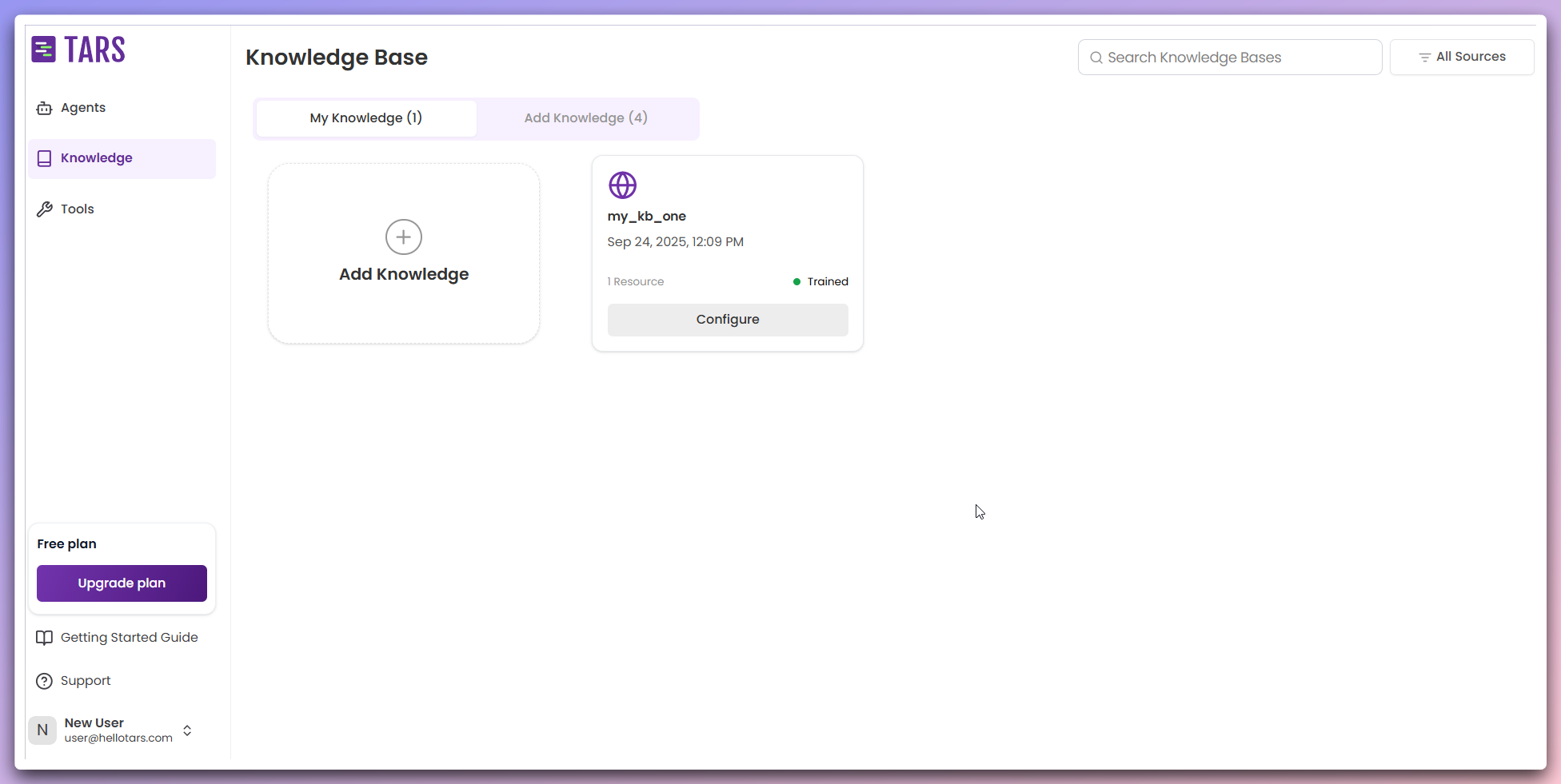
Knowledge Base Cards
Each Knowledge Base card displays:- Knowledge base name and description
- Training status - Current processing and indexing status
- Data sources - Number of data sources this KB is trained on
- Quick actions menu - Access to management functions
- Date added - When the Knowledge Base was created
Managing your knowledge bases
Configure Knowledge Base
Click the Configure Button to open a modal for customizing your Knowledge Base settings. You can edit the Knowledge Base name and description, and modify basic configuration options.
Open Knowledge Base
Use the Open option in the Quick Actions Menu to view detailed knowledge
base information, data resources, and training status.
Edit Knowledge Base
Select Edit from the Quick Actions Menu to modify the Knowledge Base name
and description.
Duplicate Knowledge Base
Choose Duplicate to create a copy of the Knowledge Base with the same name
and description, but without any data resources.
Delete Knowledge Base
Use the Delete option to remove the Knowledge Base and all associated data.
Next steps
Add new Knowledge Base
Create a new knowledge base from data sources
Knowledge Base architecture
Learn how knowledge bases are processed and indexed